


Âmbito de Aplicação
Este guia aplica-se às definições de email do Gate Web
Antes de começar: Certifique-se de que tem acesso à sua conta de email (este guia utiliza o Gmail como exemplo)
Tempo estimado: 3 minutos
Objetivo
Este guia irá orientá-lo sobre como adicionar os endereços de email oficiais do Gate à lista de permissões (whitelist) do seu email, garantindo a entrega bem-sucedida dos emails de verificação no Gate Web.
Passos
Passo 1: Identificar os Endereços de Email Oficiais do Gate
Adicione os seguintes endereços de email oficiais do Gate à sua lista de permissões:
- support@promo.gate.com
- support@send.gate.com
- support@sending.gate.com
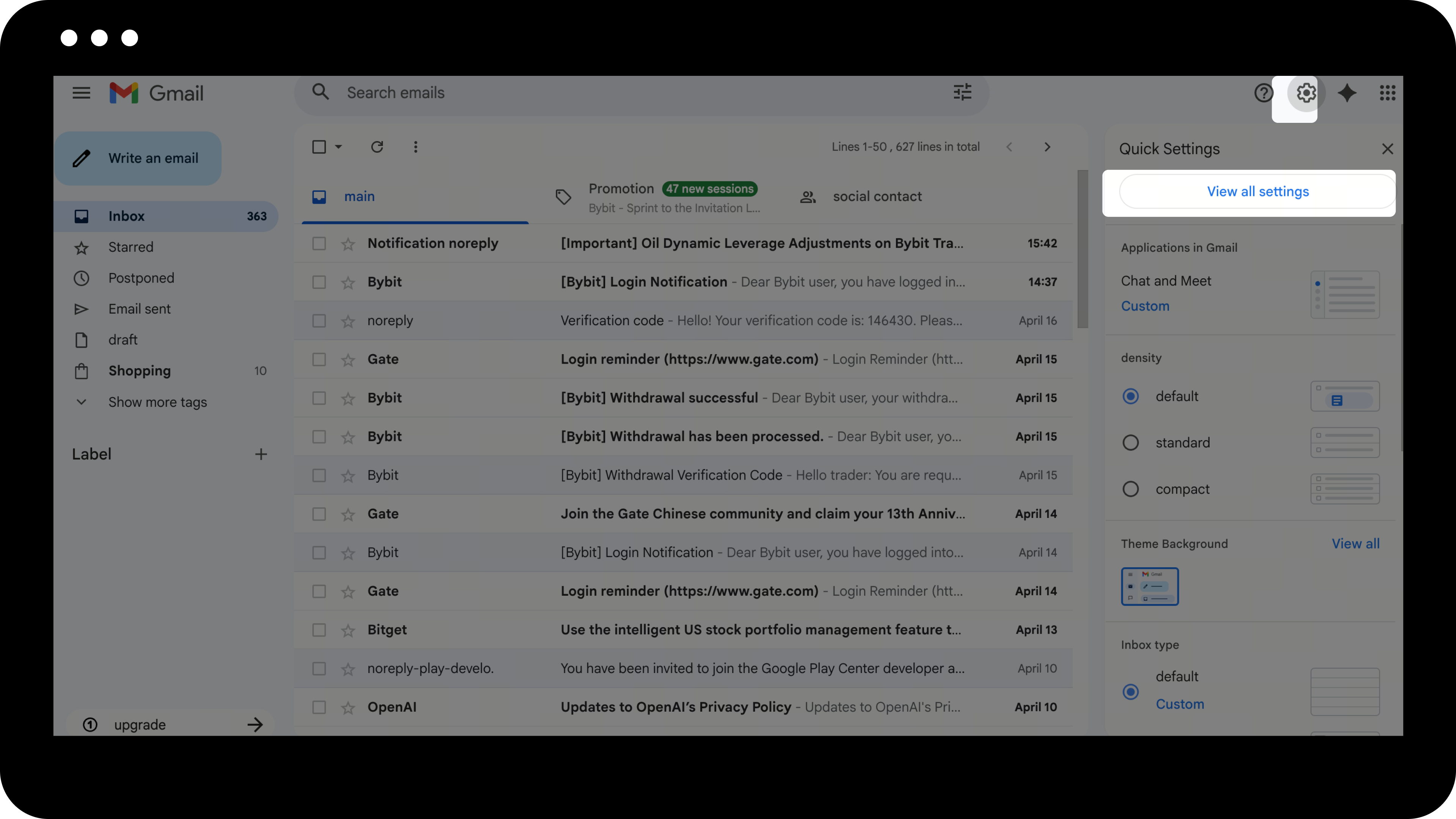
Passo 2: Aceder às Definições do Gmail
- Inicie sessão na sua conta Gmail.
- Clique no ícone de Definições no canto superior direito.
- Selecione "Ver todas as definições".
Passo 3: Criar um Novo Filtro
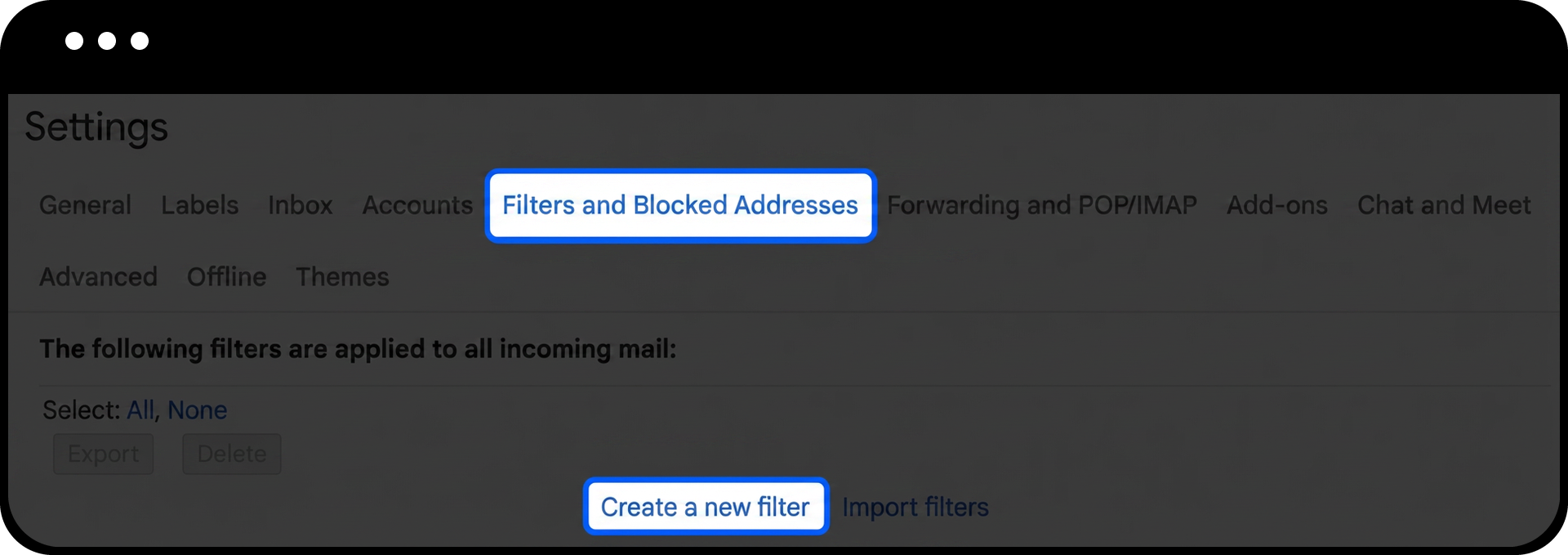
- Navegue até ao separador "Filtros e endereços bloqueados".
- Clique em "Criar um novo filtro".
Passo 4: Configurar o Filtro
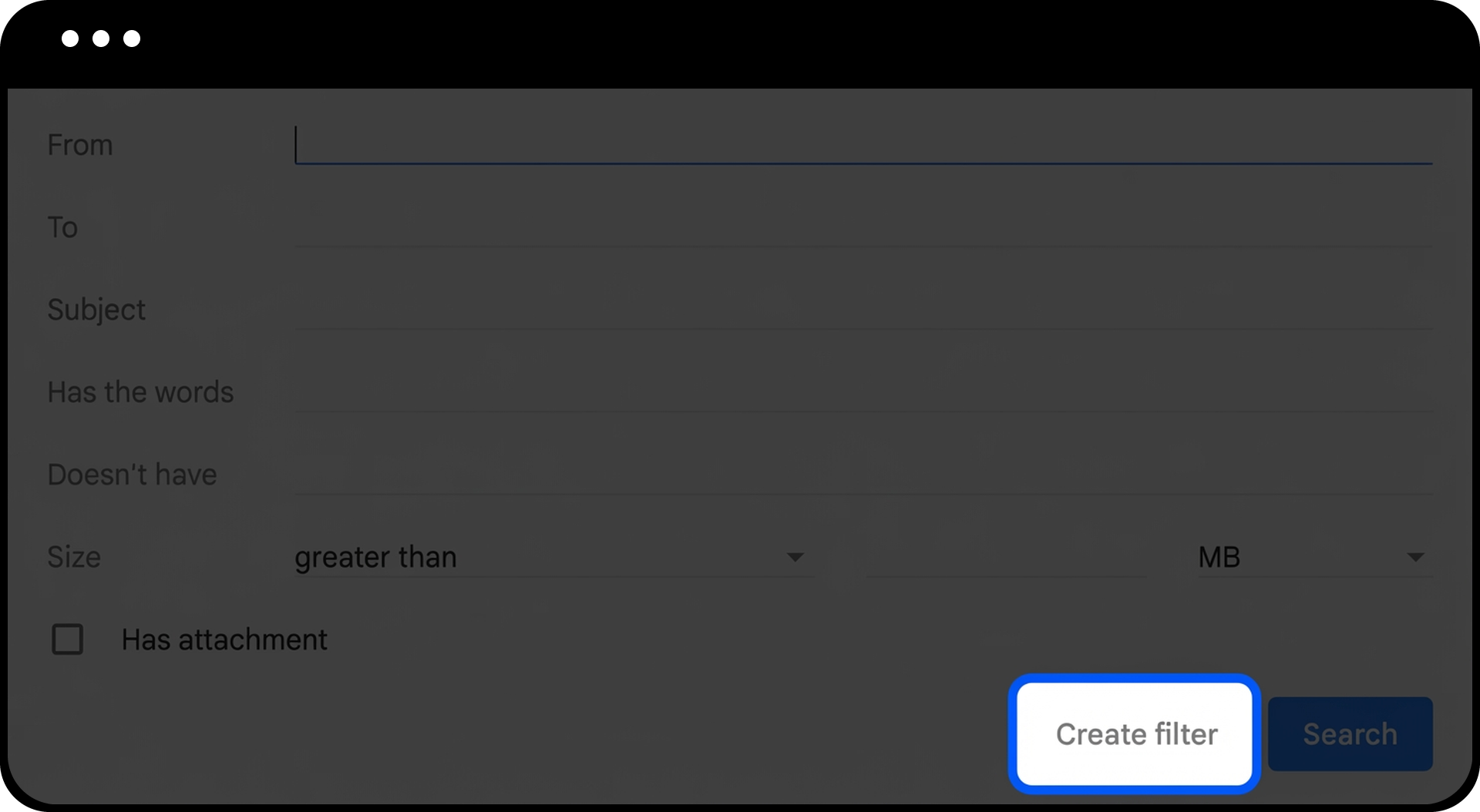
- Introduza um dos endereços de email do Gate no campo "De" (por exemplo, support@promo.gate.com).
- Clique em "Criar filtro".
Passo 5: Concluir as Definições da Lista de Permissões
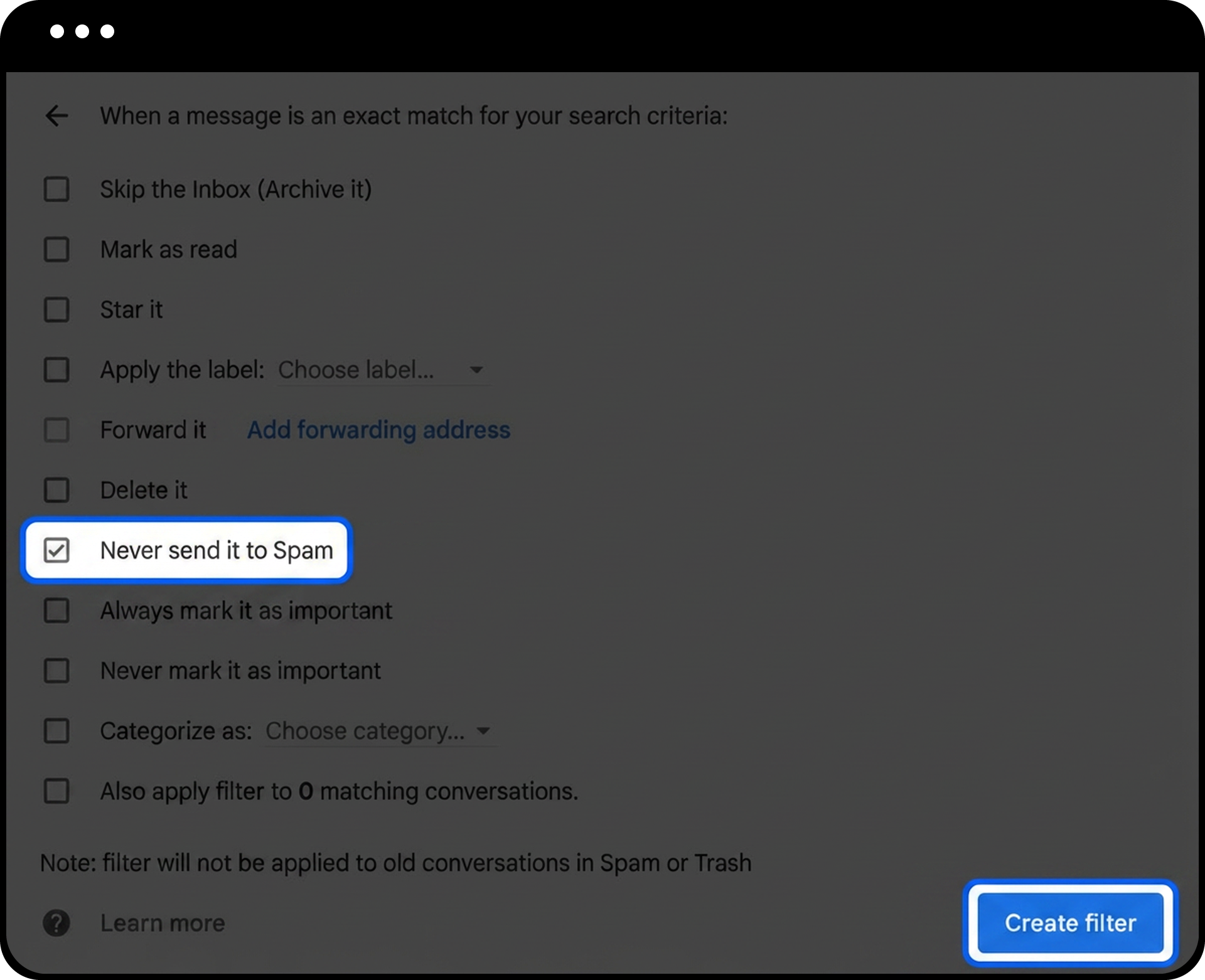
- Selecione a caixa "Nunca enviar para Spam".
- Clique em "Criar filtro" para guardar as suas definições de whitelist.
Passo 6: Repetir para os Restantes Endereços
Repita os Passos 3 a 5 para os restantes endereços de email do Gate:
- support@send.gate.com
- support@sending.gate.com
Notas
- Adicionar os endereços de email oficiais do Gate à lista de permissões não compromete a segurança da sua conta; apenas garante que recebe os emails importantes de verificação e notificação.
- A entrega dos emails pode demorar alguns minutos após a configuração da whitelist. Se, após 10 minutos, ainda não receber emails, verifique a sua pasta de spam ou contacte o apoio ao cliente.
- Diferentes fornecedores de serviços de email têm processos distintos para configurar listas de permissões. Este guia utiliza o Gmail como exemplo; para outros fornecedores, consulte a documentação de ajuda respetiva.
FAQ
Q1: Já adicionei os emails do Gate à whitelist, mas continuo sem receber os códigos de verificação. O que devo fazer?
A: Primeiro, verifique a sua pasta de spam ou lixo eletrónico. Se o problema persistir, confirme se introduziu corretamente os endereços de email na whitelist. Pode também tentar utilizar um endereço de email alternativo ou contactar o apoio ao cliente do Gate para obter assistência.
Q2: Preciso de adicionar todos os três endereços de email do Gate à whitelist?
A: Sim, recomenda-se adicionar os três endereços de email oficiais do Gate para garantir que recebe todos os tipos de notificações e emails de verificação da plataforma.
Q3: Adicionar estes endereços à whitelist afeta a segurança do meu email?
A: Não, adicionar à whitelist apenas garante que os emails destes endereços específicos são entregues na sua caixa de entrada em vez de serem filtrados como spam. Estes são endereços de email oficiais e verificados do Gate e não comprometem a segurança do seu email.
Isenção de responsabilidade
O conteúdo aqui disponibilizado destina-se apenas a fins de referência e educativos, não constituindo qualquer aconselhamento financeiro, de investimento, de negociação ou jurídico, nem representa uma oferta ou solicitação para comprar ou vender quaisquer ativos digitais. A Gate não assume quaisquer declarações ou garantias, expressas ou implícitas, quanto à exatidão, integridade ou atualidade das informações aqui contidas. As funcionalidades dos produtos, interfaces, regras e estruturas de comissões podem ser atualizadas ou ajustadas a qualquer momento. Consulte os anúncios mais recentes e a informação efetivamente apresentada na plataforma Gate para obter os dados mais precisos.
Os investimentos em ativos digitais envolvem riscos significativos, podendo os preços variar substancialmente. Existe a possibilidade de perder a totalidade do montante investido. Tome decisões de forma cautelosa, tendo em conta a sua situação financeira e tolerância ao risco, após compreender plenamente os riscos associados. Se necessário, recomenda-se consultar um consultor financeiro ou jurídico independente.
Para mais informações sobre potenciais riscos, consulte a Divulgação de Riscos e o Acordo de Utilizador da Gate.
