


Limit
A limit order is an order to trade at a preset price and amount. The user sets the order amount and the maximum buy price or minimum sell price they are willing to accept. When the market price meets the preset conditions, the system executes the order at the best available price within the specified limit range.
What is BBO?
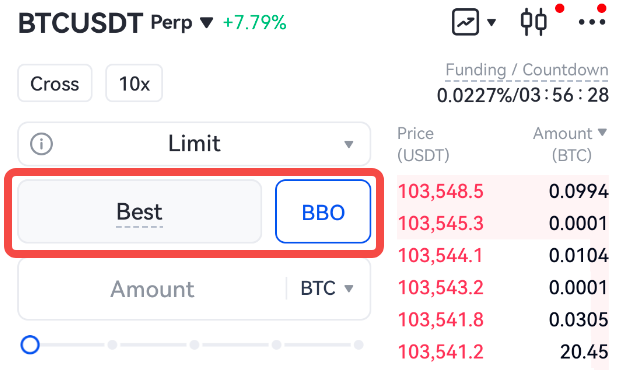
BBO (Best Bid and Offer), also known as the best bid and ask price, is a type of limit order that allows traders to quickly set the order price to the best available counterparty price in the order book, enabling faster order execution.
How a BBO order works
When placing a BBO (Best Bid and Offer) order, the selected BBO type determines the actual order price as follows:
- Counterparty 1: For buy orders, the price will be set to the lowest sell price in the order book; for sell orders, the price will be set to the highest buy price in the order book.
- Counterparty 5: For buy orders, the price will be set to the 5th lowest sell price in the order book; for sell orders, the price will be set to the 5th highest buy price in the order book.
- Queue 1: For buy orders, the price will be set to the highest buy price in the order book; for sell orders, the price will be set to the lowest sell price in the order book.
- Queue 5: For buy orders, the price will be set to the 5th highest buy price in the order book; for sell orders, the price will be set to the 5th lowest sell price in the order book.
Note: BBO orders use the order book at its highest precision level, not the one with reduced precision.
BBO orders vs. regular limit and market orders
- Limit orders require users to manually specify the order price, while BBO orders determine the price automatically based on the chosen BBO type when the order is submitted.
- Market orders execute immediately at the best available price but will move to the next available price level until fully filled or canceled if the market depth at Counterparty 1 is insufficient. In contrast, BBO orders remain as limit orders at the selected price level until filled or manually canceled, even if market depth is insufficient.
How to use BBO orders
BBO orders are available for USDT-M and BTC-M perpetual contracts. To place a BBO order, switch to the Limit order type, click the BBO button, and select a preferred BBO type (Counterparty 1, Counterparty 5, Queue 1, Queue 5) in the order price input field.
Advanced Limit
Advanced limit orders include three specialized order types: Post Only, Fill or Kill (FOK), and Immediate or Cancel (IOC):
- Post Only: Only adds liquidity as a maker order and will not match existing orders immediately. This avoids taker fees.
- Fill or Kill (FOK): Requires the entire order to be filled immediately at the specified price; otherwise, the order is canceled entirely. Suitable for large trades.
- Immediate or Cancel (IOC): Executes as much of the order as possible immediately; any remaining amount is canceled. Suitable for fast partial executions.
Market
Market orders execute immediately at the best available counterparty price. If execution deviates more than 5% from Counterparty 1, or if order consumption exceeds the allowed order book depth, the remaining portion of the order will be canceled.
Smart Market
Smart market orders combine market order execution with additional conditions or algorithms to enhance execution efficiency and optimize pricing. Execution may consider market depth, volatility, and order book conditions.
Conditional
Conditional orders become active only when specified conditions are met. Trigger conditions can be based on mark price, last price, or index price.
If the order book depth is insufficient, triggered market orders may be canceled early due to slippage exceeding 5% or excessive consumption of order book depth.
TP/SL (Take-Profit/Stop-Loss)
TP/SL orders have preset trigger prices, order prices, and amounts. When the last price, mark price, or index price reaches the trigger price, the system closes the position at the preset order price. TP/SL orders help manage position risks—TP orders lock in gains during market fluctuations, while SL orders limit potential losses. For more details on other types of TP/SL orders, please refer to Introduction to TP/SL.
Types of TP/SL orders:
- Order TP/SL: Sets TP/SL conditions when placing the order. Once triggered, the system submits a limit or market order at the preset price and amount.
- Position TP/SL: Closes a position when the trigger price is reached. Previously set TP/SL conditions are automatically canceled after execution.
- Trigger TP/SL: Allows setting custom conditions for profit-taking or stop-loss, and to specify the order quantity for position reduction.
For more details, please refer to How to Set TP/SL Conditions.
If order book depth is insufficient, triggered market orders may be canceled early due to slippage exceeding 5% or excessive consumption of order book depth.
TWAP (Time-Weighted Average Price)
TWAP orders split a large order into multiple smaller orders executed over a specified time interval to reduce market impact.
Learn more: Time-Weighted Average Price (TWAP) Order.
Trailing Stop
A trailing stop order is a type of strategy order that tracks market prices. It allows users to preset an order within a specific percentage or price variance from the market price. When the market trend reverses (pulls back), the system will automatically place the preconfigured order in the market.
Learn more: Trailing Stop Order / Trailing TP Overview.
Iceberg Pro
Iceberg Pro orders split large orders into smaller ones and executes them in batches. This helps reduce market impact, conceal trading intentions, and avoid sharp price fluctuations.
Learn more: Iceberg Pro.
Gate reserves the final right to interpret the product.
For further assistance, please visit the Gate official support page or contact our customer support team.
Disclaimer
The content provided herein is for reference and educational purposes only and does not constitute any financial, investment, trading, or legal advice, nor does it constitute an offer or solicitation to buy or sell any digital assets. Gate makes no express or implied representations or warranties regarding the accuracy, completeness, or timeliness of the information contained herein. Product features, interfaces, rules, and fee structures may be updated or adjusted at any time. Please refer to the latest announcements and the actual information displayed on the Gate platform for the most accurate details.
Digital asset investments involve significant risk, and prices may fluctuate substantially. You may lose the entire amount of your investment. Please make decisions cautiously based on your own financial situation and risk tolerance after fully understanding the associated risks. If necessary, you are advised to consult an independent professional financial or legal advisor.
For more information about potential risks, please refer to Gate's Risk Disclosure and User Agreement.
